

Accepting Bitcoin Payments:
Using Stacked's Lightning Pay Merchant Services
Brandon - Stacked Team
Updated: July 5, 2025
Stacked is setting out to solve the payments problem in New Zealand. We’ve started on our journey, building the easiest way to move in and out of bitcoin anywhere, including New Zealand.
Our vision for better payments in New Zealand begins with giving merchants a break. Through our merchant services, we aim to deliver:
- Reduced costs for every day retail payments, with zero fees incurred for merchants
- Improved cash flow through significantly reduced settlement times
Below is an overview of each of our current merchant services. For a description of fees for each of our services, please see our Merchant Fees and Limits article.
Hosted Payments
Our Hosted Payments service allows you to send your customers to a landing page to pay their invoices, hosted by Stacked or on your own website.
This is a custom integration, and requires some integration work by the merchant. But it's a simple way to integrate bitcoin payments into your website.
Documentation for our hosted payments API can be found here.
Payment Links
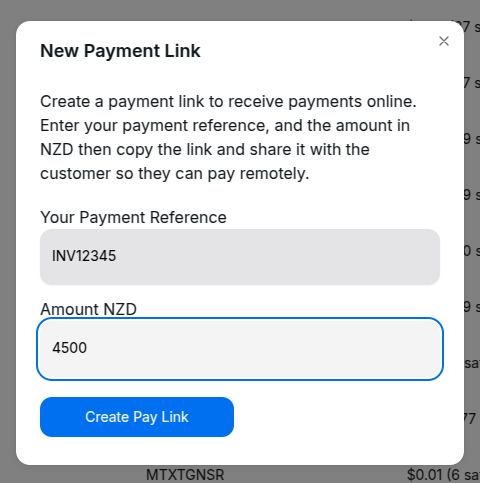
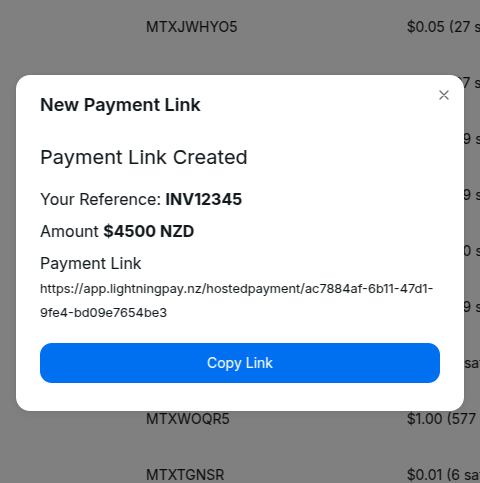
Payment Links allow you to generate a link that a customer can follow to pay on their own. You can imbed these links easily into an invoice or website.
The process would be;
- Indicate on your invoice for customers to contact you to pay an invoice with Bitcoin
- Log into Stacked and create a payment link with the invoice reference and amount
- Copy the link and email it to the customer.
- The customer clicks the link and follows the instructions.
Point of Sale App
Our solution for physical retailers is our Lightning Pay POS App, available on the iOS App Store and Google Play stores.
With the app, you simply dial in the amount you want your customer to pay (denominated in NZD), they scan the QR code with their favorite wallet, or tap their Bolt Card. Done! You will receive NZD to your bank the next business day, or bitcoin to your favorite lightning wallet immediately, depending on the settings in your profile.
Setting it up is easy.
Register at Stacked
Register at Stacked, be sure to register as a company or sole trader to gain access to our merchant services.
Setup your Merchant Profile
Login to your Stacked Account, and navigate to your “Merchant Profile.”
Be sure to choose your how you would like to receive your funds. You can choose to receive bitcoin to your own wallet immediately, or receive NZD the next business day to your bank account, or a mix of both!
Download the App
Download the App on your device of choice. This can be your own mobile device, or a dedicated device you keep for just this purpose. You can connect as many devices as you’d like for collecting payments, without worrying about security, as your account information is not accessible in the app.

Download from the iOS App Store

Download from the Google Play Store
Setup The App
Launch the Lightning Pay App. Tap on "Tap to Scan" and scan the QR code from your Merchant Profile you set up above.
All Done!
You are now ready to accept bitcoin payments in your physical retail store! Let us know how we can better serve you, and create a better payments experience by reaching out at support@lightningpay.nz.