

Using Lightning to Save on Bitcoin Fees
How Stacked Wallet can help you avoid unnecessary on-chain fees when saving in bitcoin
Written by The Stacked Team
Updated June 2026
If you save in bitcoin regularly, fees matter. Small purchases can be a great way to build a long-term bitcoin position, but if every small purchase is sent directly on-chain, your wallet can end up with lots of small UTXOs. Later, those small UTXOs can become expensive to move or spend.
This article explains what UTXOs are, why they matter, and how you can use Stacked Wallet, Lightning, and cold storage together to save bitcoin more efficiently.
UTXO basics
UTXO stands for Unspent Transaction Output. A UTXO is a piece of bitcoin that has been received by your wallet and has not yet been spent.
A simple way to think about UTXOs is to compare them to coins and notes in a physical wallet. If you need to pay $10 at a shop and you only have a $20 note, you hand over the $20 and receive change. Bitcoin works differently in the details, but the idea is similar: when you spend bitcoin, your wallet uses one or more existing pieces of bitcoin and creates new outputs.
Every on-chain bitcoin transaction creates new UTXOs. If you receive many small on-chain payments over time, your wallet may end up holding many small UTXOs.
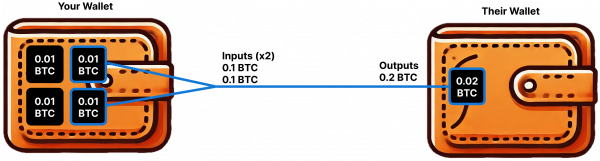
Simple Bitcoin transaction showing a UTXO exchange. Sending 0.02 BTC, or 2M sats, to a new wallet when the sending wallet has four 0.01 BTC, or 1M sat, UTXOs.
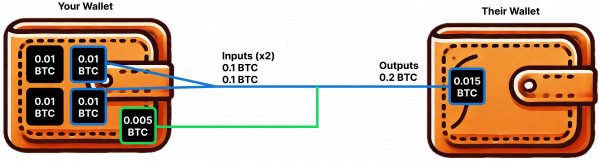
A typical bitcoin transaction requiring change to the sending wallet. A user sends 0.015 BTC, or 1.5M sats, to a new wallet when the sending wallet has four 0.01 BTC, or 1M sat, UTXOs.
Why UTXO management matters
When you send bitcoin on-chain, your transaction fee depends partly on how much data your transaction uses. A transaction that spends many UTXOs usually takes up more space than a transaction that spends one larger UTXO. More transaction data generally means a higher fee.
This can surprise people because most wallets show a single bitcoin balance. You might see one balance, but underneath that balance your wallet may be holding many separate UTXOs. If those UTXOs are small, moving your bitcoin later can become more expensive than expected.
Imagine you are at the supermarket and your total is $100. Paying with one $100 note is easy. Paying with a wallet full of twenty and fifty cent coins takes more work. Small UTXOs create a similar problem for bitcoin transactions: they can make future transactions heavier and more expensive.
A practical example
Let’s say you are dollar-cost averaging into bitcoin by purchasing NZ$100 worth of bitcoin each week.
If every purchase is sent directly to an on-chain wallet, each weekly purchase may create a separate UTXO. After one year, you could have 52 separate UTXOs from those regular purchases.
That might not matter much when bitcoin network fees are low. But if fees rise, spending or consolidating those UTXOs can become expensive.
Low-fee environment
- Fee rate: 8 sats/vB
- Cost to move one small UTXO: relatively low
- Cost to move 52 UTXOs: noticeable, but usually manageable
In a low-fee environment, many people do not notice the problem. Fees feel cheap enough that small UTXOs seem harmless.
High-fee environment
- Fee rate: 100-200 sats/vB, or higher during periods of congestion
- Cost to move one small UTXO: much higher
- Cost to move 52 UTXOs: potentially a meaningful percentage of your bitcoin balance
The exact numbers change with the bitcoin price, transaction type, and fee market. The principle is what matters: many small UTXOs can become expensive to spend when on-chain fees are high.
How Lightning helps
The Lightning Network is a payment layer built on top of Bitcoin. Lightning transactions do not create a new on-chain UTXO every time you send or receive a payment.
That makes Lightning useful for frequent, smaller bitcoin transactions. Instead of creating a separate on-chain UTXO for every regular purchase, you can use Lightning to accumulate smaller amounts first. Later, you can move a larger amount on-chain when it makes sense.
This is like exchanging a pile of small coins for a larger note before putting it into long-term storage. The goal is not to avoid on-chain bitcoin entirely. The goal is to use on-chain transactions more intentionally.
Using Stacked Wallet for regular bitcoin saving
Stacked Wallet is designed to make this strategy simpler. Instead of setting up a separate Lightning wallet just to receive regular purchases, you can use Stacked Wallet as your everyday bitcoin savings wallet.
With Stacked Wallet, you can:
- Buy bitcoin regularly using manual purchases or Auto-Buy.
- Hold bitcoin in self-custody while keeping it easy to access.
- Send and receive over Lightning for fast, low-cost payments.
- Send bitcoin on-chain when you want to move larger balances to cold storage.
- Avoid unnecessary small on-chain deposits from frequent small buys.
For most people saving regularly in bitcoin, this is now the easiest default path: accumulate smaller purchases in Stacked Wallet, then move larger balances to cold storage when appropriate.
Moving bitcoin to cold storage
Lightning and Stacked Wallet are useful for regular saving and everyday access. Cold storage is better suited to larger long-term holdings that you do not expect to move often.
Cold storage means keeping your bitcoin keys offline, usually with a hardware wallet or dedicated signing device. This can improve long-term security, but it also requires careful backup and recovery planning.
There is no perfect amount that everyone should move to cold storage. A useful rule of thumb is to think about fees as a percentage of the amount you are moving. If network fees would be too large relative to the transfer size, it may be better to wait and send a larger amount later.
As a simple example, some people may choose to move bitcoin to cold storage once they have accumulated around 1,000,000 sats, or 0.01 BTC. Others may prefer a higher or lower threshold depending on their savings goals, security setup, and comfort level.
A simple savings strategy
- Save regularly with Stacked Wallet: Use manual purchases or Auto-Buy to build your bitcoin balance over time.
- Use Lightning for smaller activity: Avoid creating unnecessary on-chain UTXOs for every small transaction.
- Move larger balances on-chain: When your balance reaches an amount worth moving, send it from Stacked Wallet to your cold storage wallet.
- Use cold storage for long-term savings: Keep larger holdings offline with a secure backup and recovery plan.
- Be intentional with future transactions: Avoid creating lots of small UTXOs unless there is a good reason.
This approach helps you keep regular bitcoin saving simple while reducing the chance that future on-chain fees eat into your savings.
Consolidating UTXOs during low-fee periods
If you already have a wallet with many small UTXOs, you may want to consolidate them during a low-fee period.
Consolidation means sending many smaller UTXOs to yourself in a single transaction, creating one larger UTXO. This can make future spending cheaper and easier.
But consolidation is not always the right move. It still costs a transaction fee, and it can have privacy tradeoffs because it links multiple UTXOs together. If you are unsure, take your time and learn how your wallet handles coin control before consolidating large amounts.
Exploring UTXO costs with a fee calculator
To understand how fees can affect your transactions, you can use tools like the Economically Unspendable Bitcoin UTXO Calculator created by Jameson Lopp.
This tool lets you test how different fee rates and UTXO sizes affect the cost of moving bitcoin.
Key variables
- UTXO size: The amount of bitcoin in each output.
- Transaction type: For example, Taproot, SegWit, or legacy transaction formats.
- Fee rate: The current or projected fee rate, measured in sats/vB.
- Wallet setup: Multisig wallets and other setups may require more data to spend, which can affect transaction fees.
Fee calculators are not perfect predictions, but they are useful for understanding why small UTXOs can become a problem in high-fee environments.
Final thoughts
UTXO management is an important part of saving in bitcoin. You do not need to obsess over every transaction, but you should understand the basic tradeoff: many small on-chain deposits can become expensive to move later.
Stacked Wallet gives you a simpler way to manage this. You can save regularly, use Lightning for smaller activity, and move larger balances to cold storage when it makes sense.
The goal is simple: keep your bitcoin useful today, while making sure it remains practical and cost-effective to move in the future.
Ready to get started? Set up Stacked Wallet and start saving bitcoin more efficiently today.